What’s this blog about?
A while ago, I made an attempt to re-create a BSP for Nanopi Neo H3 by reading some online sources and comparing the differences between mainline & FriendlyElec’s (the board manufacturer) fork.
I thought I’d share what I’ve learned, and specifically for this blog, I’ll be sharing my experience porting U-boot, the bootloader.
In this blog, although the main focus is Nanopi Neo (and therefore Allwinner SoCs), I try to share a more general approach to porting U-boot, unlike my previous blog on adding U-boot to Rpi’s boot sequence.
How ARM computers boot & Introduction to U-Boot
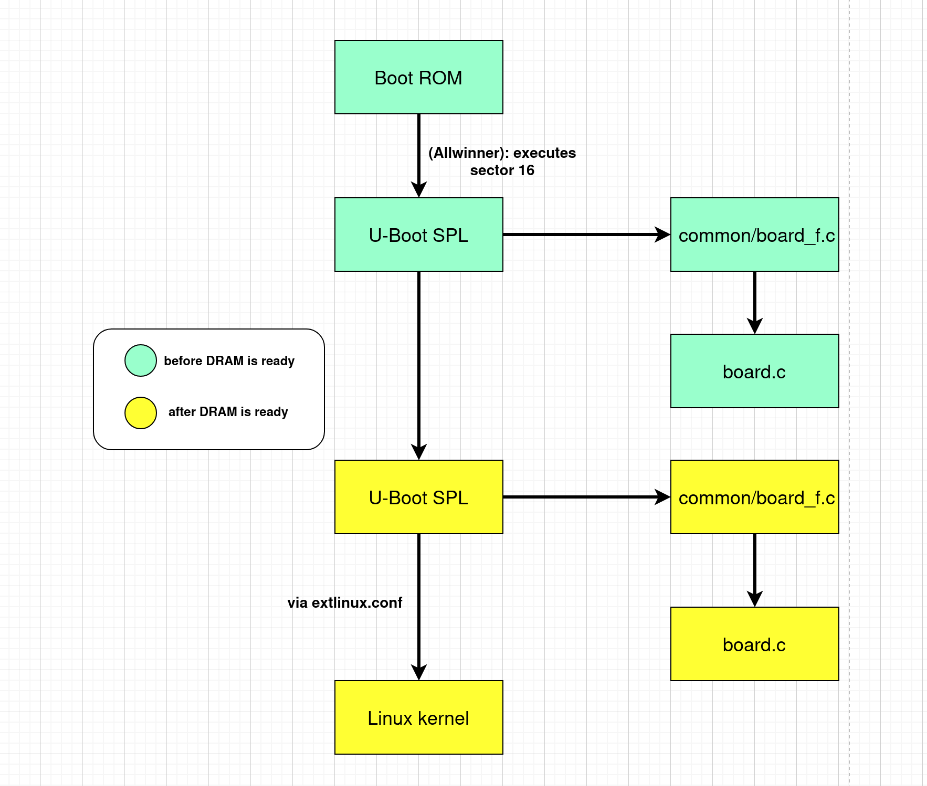
Although different SoCs boot differently (and therefore you should do some Googling to find out), in general, when booted, ARM SoCs execute a binary inside its integrated ROM, known as ROM code. This ROM code (which is proprietary and always resides in the SoC’s integrated ROM) is the primary bootloader and its job is to run the secondary bootloader, which in our case is U-boot. For Allwinner H3, the ROM code doesn’t actually “know” how to run the secondary bootloader - it only executes a binary that’s stored in sector 16 (8 KiB offset).
However, it is often the case that during early stages of booting, external DRAM is not yet ready, so ROM code will instead load U-boot to internal SRAM.
This raises another problem: Internal SRAMs don’t usually come in large capacity, so to work around this, we’ll ask the ROM code to launch U-boot SPL instead, which is the trimmed down version of U-boot used to execute a list of functions during early boot such as DRAM initialization & moving the bootloader to DRAM.
The list is defined in common/board_f.c and we can override some or all of the functions there in our own board.c file, which will be discussed later.
Once everything is ready, U-boot SPL will load U-boot proper (the fully-fledged U-boot) & Trusted Firmware (won’t be discussed here, but you can find more info here and here) to DRAM and hand control over to U-boot proper.
U-boot proper will then execute a list of functions defined in common/board_r.c (which is overridable in board.c) before launching the kernel (which it knows from extlinux.conf).
Again, different vendor has different way of making their SoCs boot. However, in general, the overall workflow (excluding Trusted Firmware) is:
Creating board.c file & sourcing it
As mentioned before, we can override the functions that U-boot will execute. For Allwinner boards, this is not necessary, so I won’t be diving deep. However, here are the steps needed:
- Create the file in
board/vendor_name/board_name/board.c. - Create the
Kconfiginboard/vendor_name/board_name/Kconfig. Here, you will declare macro-like constants (such asCONFIG_ARM). - Define the compiled output of the
Kconfigfrom step 2 inboard/vendor_name/board_name/Makefileand also source saidKconfiginarch/arm/Kconfig&arch/arm/vendor_name/soc_name/Kconfig.
Creating board’s defconfig
Before compiling U-boot, we run make BOARD_DEFCONFIG. Here, we also need to create our defconfig. Since I’m just re-porting Nanopi Neo, I didn’t actually create a new defconfig. However, if I were to create a new one, I would start by finding similar board’s defconfig and use it as base.
Then, I would add new configs (for example, if I’m creating a new board.c and the Kconfig “macro” is CONFIG_MY_BOARD, then I’ll also add the line CONFIG_MY_BOARD=y).
Lastly, I’ll also link the device tree here.
Creating board’s device tree
There is no need for me to create a device tree this time, but we may need a device tree even for the bootloader because it may need to know the board’s layout when doing some initializations.
Compiling U-boot
Once everything is ready, simply run make BOARD_DEFCONFIG & make. In my case, the finished binary is called u-boot-sunxi-with-spl.bin.
Partitioning the disk
Before installing the bootloader, we first need to partition the disk (in our case SD card). According to Allwinner’s guide, we need to create a 16MB boot partition (vFAT filesystem) with 1MB offset. The rest is root (ext4 filesystem).
Installing compiled image
Since everything is ready, we can just move our compiled bootloader:
dd if=u-boot-sunxi-with-spl.bin of=/sd/card/mountpoint bs=1k seek=8
Conclusion
And that’s it. Now we already have the bootloader ready in our system. Up next is the OS: Linux porting & installing the root.